
Archiving classes helps keep your dashboard organized by hiding classes you're no longer actively using. Archived classes can still be accessed when needed.
How to archive a class
-
Go to the Classes tab
-
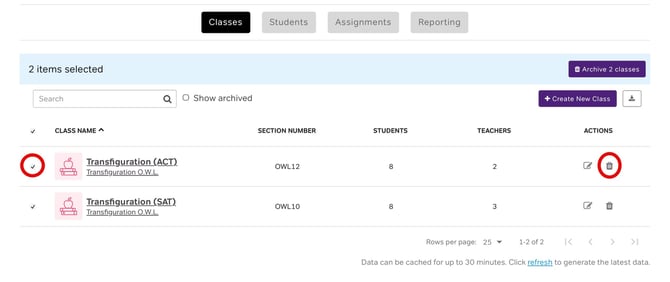
Find the class you want to archive
-
Click the check box to the left if you want multiple, or click the trash can icon to the right
-
Confirm that you want to archive the class
How to access archived classes
-
Go to the Classes tab
-
Look for the Archived Classes section or toggle
-
Click to expand and view your archived classes
What happens when you archive a class
-
The class is hidden from your main Classes view
-
Students enrolled in only that class will no longer have active access
-
All class data and student progress is preserved
-
You can still view reports for archived classes
Unarchiving a class
To restore an archived class, contact Magoosh support. Include the class name and we'll reactivate it for you.
*End-of-year tip*
Archive classes at the end of each school year or term to keep your dashboard clean while preserving historical data.