
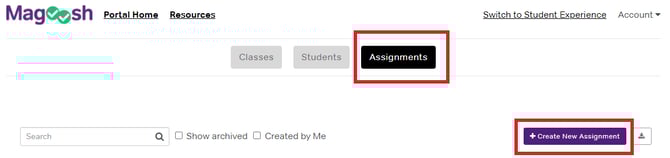
1. Navigate to the educator portal homepage.
2. Click on "Assignments" and "Create New Assignment."
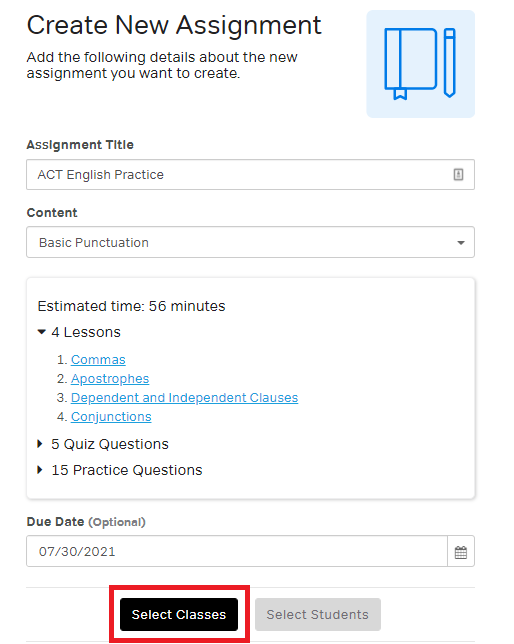
3. Enter a title, select the content, and choose a due date (optional).
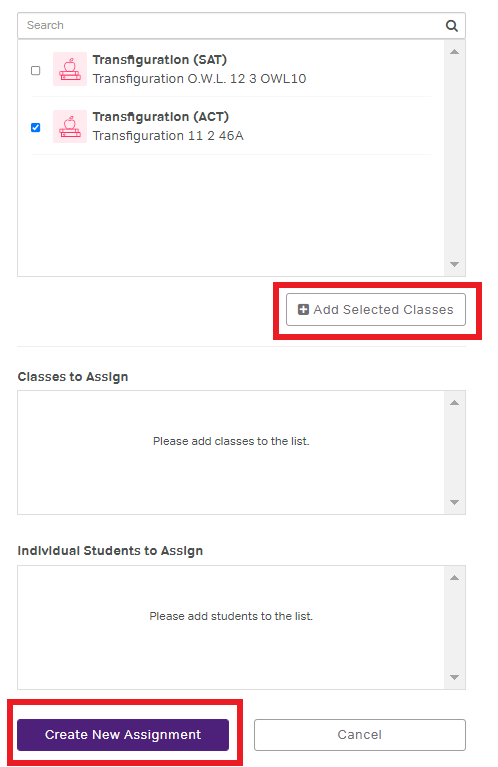
4. Then click on "Select Classes" and search the class by name.
5. Once the class(es) are added, click on "Create New Assignment."
Tips for effective assignments
-
Use descriptive titles that students will understand (e.g., "Week 1: Math Foundations" rather than "Assignment 1")
-
Set due dates 3-5 days out for most assignments to give students flexibility
-
Start with the recommended study plan assignments if you're unsure where to begin
-
Check the estimated completion time when selecting content
For more information, check out our video tutorial below: