
School-level reporting gives administrators a comprehensive view of Magoosh usage and performance across your entire school or district. Use it to monitor engagement, track instructor adoption, and share data with district leadership.
Accessing School Data
-
Navigate to the Educator Portal homepage
- Click on Schools in the main navigation
- Here you can view detailed usage per class including a total of time spent by students, questions answered, videos watched, and assignments.
- Activity data can be represented in multiple classes if a student is enrolled in more than one, but the number of assignments is specific to that class.
Select a school to view detailed data
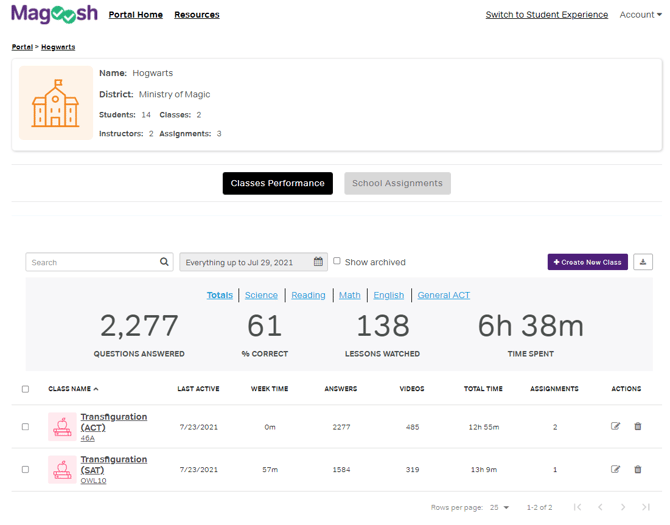
Available School-Level Metrics
- Total number of active classes
- Total enrolled students
- Number of instructors
- Assignments created across all classes
- Aggregate time spent across all students
- Questions answered school-wide
- Lessons watched
- School-wide performance by section
School Assignments View
-
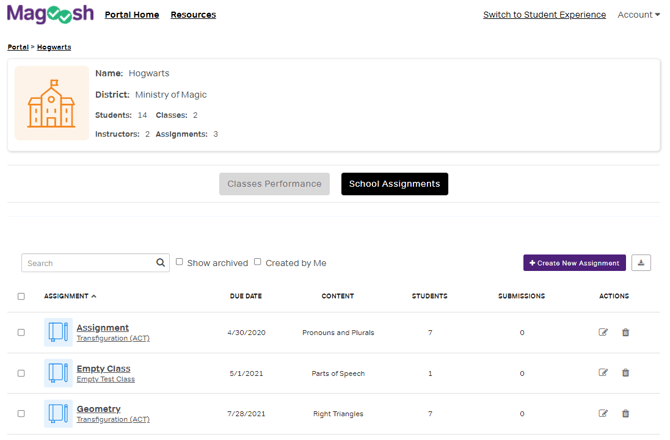
Click on School Assignments
-
Here you can see an overview of all assignments created by your teachers across the school, including assignment name, class, due date, and completion status.
Exporting School Data
In the Reports section you can download school-wide data for board reports or district analysis.
- Navigate to the Reports tab or the Students tab
- Use the download icon in the upper right of the chart
- The exported file includes all available metrics for the selected date range in CSV format
Using School Data
For Administrators, you can use this data to:
- Monitor instructor adoption and usage
- Identify classes they may need support
- Report on student engagement
- Compare performance across grade levels or subjects
For District Leaders, you can also use this data to:
- Compare schools within the district
- Track implementation progress
- Identify best practices to share across schools
Who Has Access
School-level data is available to any admin account configured in Magoosh. We typically recommend this access level for school administrators and district-level leaders.
Contact your Magoosh account manager to set up admin accounts.