
This article explains how to unenroll a student from a class. To unenroll a student, go to the Classes tab, open the class, find the student, click the minus icon (−) under Actions, and click Unenroll Student. You may need to do this if a student has left your school, changed courses, or was enrolled by mistake.
Transferring a student between classes? Enroll them in their new class first, then remove them from their old class.
Removing a Single Student
-
Go to the Classes tab
-
Click on the class name the student is currently enrolled in
-
Find the student in the roster (use the search box for large classes)
Note: You must have teacher or administrator permissions to unenroll students.
-
Click the minus icon (−) in the far right column under Actions
-
Click Unenroll Student to confirm
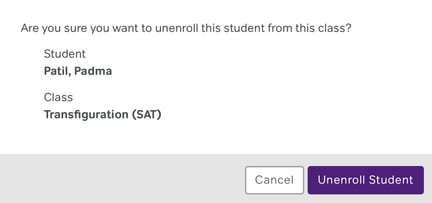
What happens when you unenroll a student
-
The student is removed from the class roster
-
They no longer see assignments from that class
-
Their practice history and progress data is preserved
-
They can be re-enrolled later if needed
- They keep their account. It does not return to your available account licenses.
Unenrolling multiple students
To remove several students at once, repeat the steps above for each student individually. There is currently no bulk unenroll option. If this is something you need, contact support — they can confirm whether this feature has been added in a recent update.
Re-enrolling a student
If you need to add a student back to a class, follow the standard enrollment process. Their previous progress will still be available. For step-by-step instructions, see the Enrolling Students article.
Archiving vs. Removing
Remove a student when they need to leave the class or move to another class. Archive a class at the end of a term or year when all students have completed it. For instructions on archiving a class, see the Archiving Classes article.